

What you need
Two codes, issued by AADE when you register the business for the myDATA REST API:- AADE user ID — the Όνομα Χρήστη you choose at registration
- Subscription key — the Κωδικός API AADE generates for it
Getting the codes from AADE
1
Open the registration page
In a browser (not inside any accounting program), go to aade.gr › Υπηρεσίες προς Επιχειρήσεις › myDATA – Ηλεκτρονικά Βιβλία ΑΑΔΕ › Εγγραφή στο myDATA REST API, and sign in with Taxisnet codes.
- Sole trader / freelancer: sign in with your own personal Taxisnet codes.
- Company (ΑΕ, ΙΚΕ, ΕΠΕ, ΟΕ, ΕΕ): sign in with the Taxisnet codes of the legal representative or of the authorised accountant — a person, not the company’s own codes. AADE recommends this over using the company’s codes.
2
Companies: choose which business you are acting for
Click Προφίλ Χρήστη (top right, next to your name) › Επιλογή Φορολογούμενου. Choose Εκπρόσωπος Νομικού Προσώπου or Λογιστής / Λογιστικό Γραφείο to match the codes you signed in with, then pick the company’s ΑΦΜ from the list.The company appears in that list only if the authorisation already exists in Taxisnet. If it’s missing, see Authorising an accountant below, then come back.Check that the text at the top right now says you are representing that company.
3
Create the user
Open Εγγραφή στο myDATA REST API and fill in Νέα Εγγραφή:
- Όνομα Χρήστη — Latin letters and digits only. It must be unique across all of AADE’s registrations, so something like
taxlayer-acme2026is safer thanadmin. This becomes your AADE user ID. - Email — where AADE sends notices about this registration.
4
Copy the subscription key
In the Χρήστες list, the Κωδικός API column is the Subscription key. Copy it exactly — it’s long and case-sensitive.You can come back to this list any time to see the codes again, or to Διαγραφή a user and create a fresh one.
5
Enter them in TaxLayer
- Business: Settings › Organisation › Finance & Tax › AADE User ID and Subscription Key › Save changes. Or use the Connect your sources window on your first visit.
- Firm: open the client › Edit Client › Finance & Tax › myDATA Credentials. Or Add codes next to the client in the Connect your sources window.
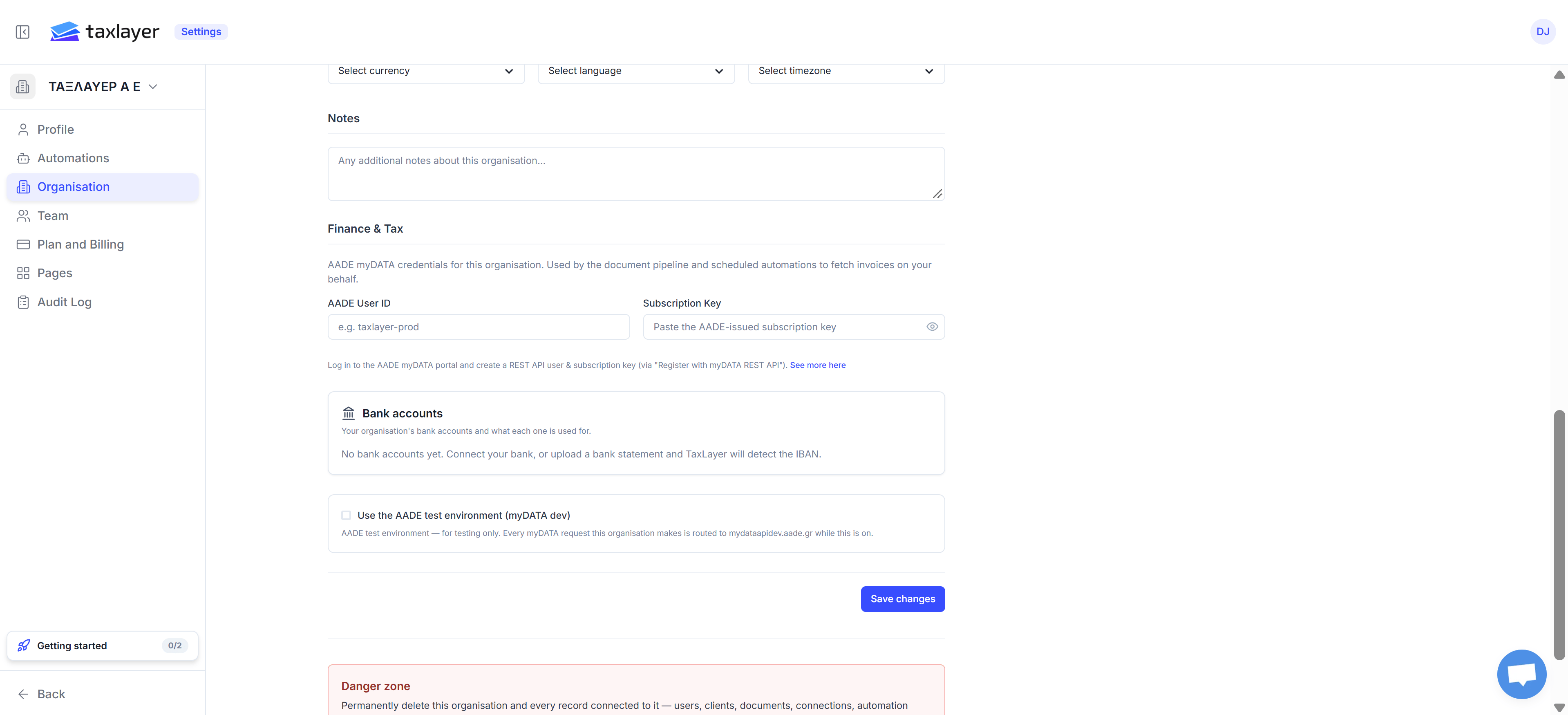
Business: Settings › Organisation › Finance & Tax
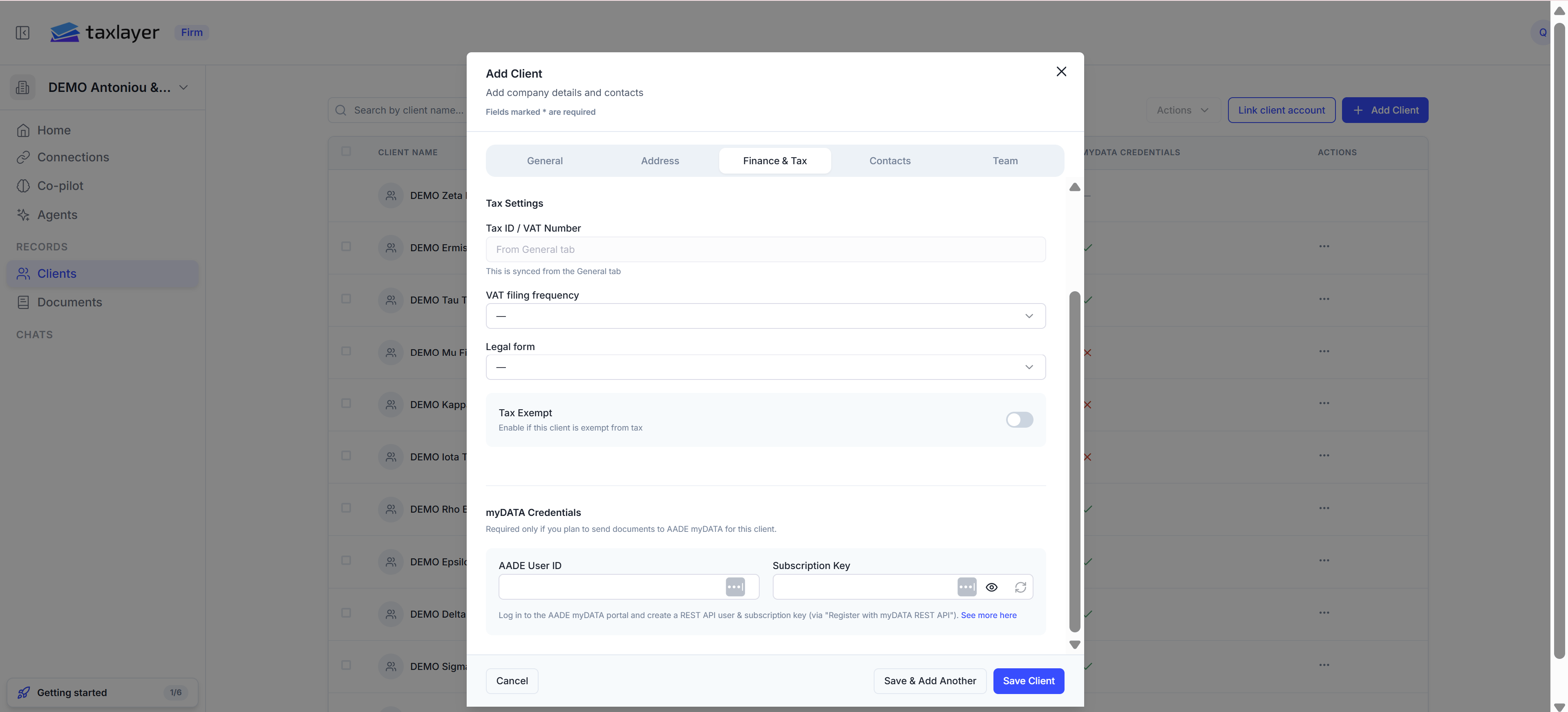
Firm: Edit Client › Finance & Tax
Accounting firms: one registration per client
TaxLayer asks for a separate user ID and key for each client, registered while representing that client (step 2 above). Create them as you add clients; Save & Add Another on the Add Client window keeps the last codes typed so you can tell them apart. AADE lets a firm act for every authorised client with the firm’s own single key. TaxLayer doesn’t use that route yet — enter each client’s own codes.Authorising an accountant
For an accountant to register a company’s API user, the company must first authorise them in Taxisnet: aade.gr › myTAXISnet › Εξουσιοδοτήσεις, for the subject Διαχείριση Ηλεκτρονικών Βιβλίων. Until that’s done, the company won’t appear under Επιλογή Φορολογούμενου. A salaried in-house accountant (Λογιστής Μισθωτός) is authorised from the Εκπρόσωπος option instead.What syncs
- Every invoice the business issued that has been reported
- Every invoice the business received from Greek suppliers who reported it
- Income, expense and VAT figures
Sync states on the Home page
Filing frequency and legal form
Two settings make the VAT and tax figures accurate:- VAT filing frequency (Monthly or Quarterly) sets which period “VAT due” refers to and when the return is due.
- Legal form (AE, IKE, EPE, OE, EE, Sole trader, Freelancer) sets the rate the income-tax estimate uses.